What is digital accessibility for government?
Digital accessibility refers to designing and developing digital content, tools, and technologies that can be easily accessed, understood, and used by everyone, including people with disabilities.
State and local governments are required by law to make sure websites and digital services are accessible to everyone. Moreover, when services are inaccessible, agencies carry increased operational costs and suffer service failures, legal liability, and hefty fines ranging from $75,000 to more than $200,000 per violation.
But governments that treat conformance as an ongoing effort — not a one-time project — achieve accessibility while delivering services that work for everyone while lowering the cost to serve and the burden on staff.
If accessibility still feels foreign in your organization, that's not only OK. In fact, it's pretty normal. You are not alone in that.
Katy Jones
Quality Manager & Accessibility Expert, Granicus
What the law requires: Deadline extended, but still looming
The U.S. Department of Justice (DOJ) updated the Americans with Disabilities Act (ADA) to require state, local, and special district governments to meet WCAG 2.1 Level AA standards. In April 2026, deadlines were extended — but compliance is still approaching quickly.
Updated deadlines:
- State and local governments with populations of more than 50,000: April 26, 2027
- Special districts and public entities with populations less than 50,000: April 26, 2028
The extension is not a pause, but rather an opportunity to build something that lasts. Delaying action increases risk, and remediation becomes more complex over time. Agencies that use this time well won’t just meet the deadline; they’ll avoid the cycle of reactive fixes that follows every audit.
Learn more: Understanding website accessibility for state and local government (White Paper)
Stay current: New accessibility laws: Critical deadlines government agencies can’t miss
Webinar: Web and mobile accessibility laws are changing — is your government ready?
ADA, WCAG, and Section 508 explained
The ADA, WCAG, and Section 508 all work together to define and enforce digital accessibility — but they serve different roles.
- ADA and Section 508 are laws that require accessibility.
- WCAG is the technical standard used to meet those requirements.
The key difference is enforcement:
- The ADA is enforced through the Department of Justice and legal action.
- Section 508 is enforced through federal procurement requirements.
- WCAG itself is not enforceable unless it is referenced by law.
Today, both the ADA and Section 508 rely on WCAG as the benchmark for compliance.
For example, if a government website lacks alt text for images on its public service pages, that’s a potential ADA violation. WCAG defines the alt text requirement and how to meet it.
- ADA (Americans with Disabilities Act): A U.S. law that requires equal access to services, including digital experiences provided by state and local governments.
- WCAG (Web Content Accessibility Guidelines): The global standard for making digital content perceivable, operable, understandable, and robust.
- Section 508: This law requires U.S. federal agencies and contractors to make electronic and information technology accessible, using WCAG as the reference standard.
What does accessibility actually mean: The POUR Framework
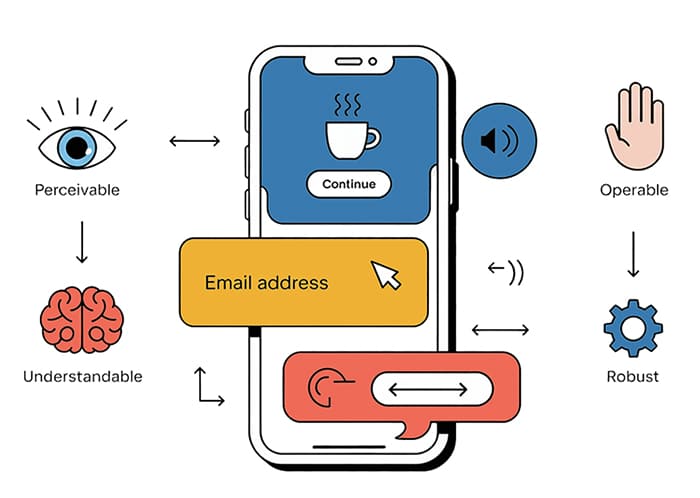
Accessibility hinges on whether people can perceive, operate, understand, and reliably use your digital services and content. The WCAG guidelines organize this using four principles known as POUR:
Perceivable: Information can be seen, heard, or read by people using assistive technologies. This means images have meaningful alt text, videos have captions, and documents don’t rely solely on color to convey meaning.
Operable: Interfaces work with keyboards, screen readers, and alternative input methods. Users shouldn’t require a mouse to navigate your site or complete a form.
Understandable: Content, forms, and interactions are clear, predictable, and usable. Instructions are plain. Error messages explain what went wrong. Navigation is consistent.
Robust: Digital experiences work across devices, browsers, and evolving technologies. Content built to current standards holds up as assistive technologies advance.
For governments, conformance means applying these principles every day — across websites, services, meeting materials, communications, and public records — developing a way of working rather than working toward a single audit.
Start here: Digital Accessibility Checklist
Reference: Website Content Accessibility Guidelines (WCAG)
How to operationalize accessibility across your team
Accessibility is not a one-time audit, badge, or automated score. There is no independent authority that can certify permanent accessibility compliance. It’s a sustained conformance program that must adapt as websites, services, and content are updated and expanded.
Organizations that treat accessibility as operational — not just technical — build seamless, inclusive experiences that holds over time. That means three shifts in how work gets done:
1. Embed accessibility into publishing workflows
Every content decision is an accessibility decision. When staff upload a document, publish a news post, embed a video, or update a form, they’re either maintaining or degrading accessibility.
This includes:
- Ensuring documents and PDFs are structured and tagged before publishing.
- Building forms that are keyboard-accessible and screen reader compatible by default.
- Creating content that works without relying on sight, sound, or a mouse.
The goal is to make the accessible path the default path through templates, checklists, training, and review steps built into existing workflows rather than added as a separate compliance layer.
Practical starting point: 3 Things You Can Do to Improve Website Accessibility
Reference: Website Content Accessibility Guidelines (WCAG)
2. Assign ownership and train consistently
Shared responsibility without clear accountability defaults to no accountability. Accessibility ownership must extend beyond websites to include:
- Document publishing and form creation
- Meeting materials and public records
- Navigation and interaction design (including keyboard usability)
Identify who owns accessibility for each content area — communications, IT, clerk’s office, marketing — and ensure each team has the training and guidance to act on that ownership. Accessibility policies need to be documented, not assumed.
Clarity on accountability: Who’s Responsible for Web Accessibility?
For city-specific teams: Building Digital Accessibility for City Government
3. Monitor continuously, not periodically
Accessibility degrades between audits. New content goes up, templates change, integrations update, and what was compliant last quarter might not be today.
This is especially true for:
- Newly published documents and PDFs
- Updated forms and service workflows
- Third-party widgets or embedded components
Regular monitoring — automated scans supplemented by manual review, keyboard testing, and public feedback channels — surfaces issues early enough to fix without crisis.
How to use automated reports effectively: Understanding and Working with Automated Website Accessibility Reports
All Granicus solutions accessibility support: Accessibility FAQ — Granicus Solutions
Good accessibility looks like consistent progress, not perfection. The organizations with the strongest programs aren’t necessarily the ones with the largest budgets — they’re the ones that made accessibility a repeatable part of how work gets done.
Treating accessibility as an ongoing effort strengthens access, usability, equity, and trust while minimizing risk to your government or destination long after any single deadline has passed.
How West Palm Beach operationalized this: West Palm Beach’s online presence and crisis comms with Service Cloud
How Cabarrus County improved user experience: Cabarrus County improved user experience with OpenCities
How to scope digital accessibility across services and facilities
Digital accessibility is closely tied to how residents use government services in the real world. For many agencies, the website is the front door to building entrances, parking areas, meeting spaces, and on-site facilities.
If key information isn’t accessible online, residents cannot plan visits, complete tasks, or access services independently.
To scope accessibility in a practical, defensible way, map it across service delivery:
- Digital services: forms, applications, documents, service information, and online transactions
- In-person services: facilities, service counters, meeting spaces, and public-facing environments
- Connected journeys: how residents move between online and in-person experiences
This approach ensures:
- Accessibility is applied consistently across websites, portals, and departments.
- Information about services is aligned across channels.
- Compliance efforts reflect how residents actually interact with government.
Scoping accessibility this way helps organizations prioritize work, reduce duplication across platforms, and avoid gaps where digital and in-person experiences don’t align.
Accessibility isn't just about compliance. When you make services and experiences more accessible, you are helping your family, your friends, your colleagues, and even yourself.
Katy Jones
Quality Manager & Accessibility Expert, Granicus
Who is responsible for accessibility?
Accessibility outcomes rest with the organization providing the services or information.
Governments are responsible across four areas:
1. Content creation and maintenance
How content is written, uploaded, and maintained determines whether it’s actually usable. This means ensuring images include meaningful alternative text, PDFs use proper headings and reading order, links are descriptive rather than generic (“click here”), color contrast meets minimum standards, and videos include accurate captions and transcripts. Content should be usable without sight, sound, or a mouse.
Practical guidance: 3 Things You Can Do to Improve Website Accessibility
Understanding reports: Understanding and Working with Automated Website Accessibility Reports
2. Site configuration and branding
Configuration decisions can prevent — or introduce — accessibility barriers. Templates, navigation structures, color palettes, forms, integrations, and document formats all require deliberate choices so digital experiences remain keyboard-accessible, readable on mobile devices, and compatible with assistive technologies.
See it in practice: How Richland County built an award-winning, accessible website redesign
3. Governance, training, and internal accountability
Accessibility requires clear ownership. Staff who create or manage content and services need training on WCAG-aligned practices. Policies and decisions need documentation so accessibility is applied consistently across teams, not managed ad hoc.
Role clarity: Who’s Responsible for Web Accessibility?
For city teams: Building Digital Accessibility for City Government
4. Monitoring, feedback, and documentation
Regular testing, responsiveness to public feedback, and documented progress are all part of a defensible accessibility program. Automation surfaces issues but doesn’t catch everything. Organizations that document good-faith effort — and act on it — are in a fundamentally different legal and operational position than those that don’t.
Read: Inaccessible Is Not an Option
These are leadership decisions as much as technical ones. Vendors support accessibility through platforms, guidance, and tools, but governments remain accountable for how standards are applied and maintained over time.
How to fix existing issues: Remediation
Most organizations arriving at this page aren’t starting from zero — they have existing websites, documents, meeting archives, and service portals that need work. Remediation is where most of the real effort lives.
Start with a prioritized audit, not a complete overhaul
Automated scanners identify many issues but miss others — particularly those requiring human judgment, like whether alt text is meaningful or whether a form error message is actually helpful.
Begin with a combined automated and manual review of your highest-traffic pages, most critical services, and frequently used documents.
Prioritize fixes based on user impact
Remediation is easier to manage — and easier to defend — when teams focus on impact instead of trying to fix everything at once.
Start with:
- Service-critical workflows (payments, permits, applications, forms)
- High-visibility pages (homepages, alerts, contact pages)
- Public-facing records and meeting materials
Within these areas, prioritize issues that block users from completing tasks, including:
- Navigation and menus
- Forms and validation errors
- Search and filtering tools
- Keyboard navigation and interaction patterns
These failures are most likely to prevent task completion and are where ADA compliance risk escalates. Barriers in core services can be interpreted as denial of access.
Fix at the system level, not page by page
Avoid one-off fixes wherever possible. Many accessibility issues are caused by templates, components, and shared patterns.
Prioritize updates that:
- Resolve issues across multiple pages at once
- Improve consistency in navigation, structure, and interaction
- Reduce the need for repeated remediation
This approach reduces effort over time and creates a more sustainable path to compliance.
Address documents and form compliance separately from web pages
Documents and forms require their own remediation approach.
PDFs, meeting records, and legacy files often need individual review and might not be fixable at scale in the same way as web templates.
Establish a triage process:
- Remediate documents that are actively used or required for services.
- Replace documents with accessible HTML alternatives where possible.
- Archive or remove documents that no longer serve a purpose.
Don’t let remediation stall governance
Fixing existing issues and preventing new ones must happen in parallel.
Organizations that get stuck in remediation mode without updating publishing workflows will continue introducing new accessibility issues — creating a cycle of rework instead of progress.
Checklist: Digital Accessibility Checklist
Reporting: Understanding and Working with Automated Website Accessibility Reports
See how Arlington approached data-driven remediation: Arlington’s resident-first approach to digital transformation
Make accessibility statements actionable
Accessibility statements are often treated as a legal requirement — but in practice, they function as an operational control that defines how accessibility is managed and maintained.
Many accessible government website efforts stall because the accessibility statement is treated like a legal footer instead of an operational tool. A better approach is to add a clear section that tells users exactly how to request assistance, report barriers, and access alternate formats. At minimum, include:
- What assistive technology has been tested (and what that testing covers).
- What services and content are provided in accessible formats.
- How issues are tracked, plus a timeline for fixes when barriers are found.
To comply with ADA compliance obligations, be explicit about ownership (department contact or role), expected response times, and how feedback is documented.
That turns a static page into a working accessibility control that supports accountability across agencies and reduces repeat support requests.
BEST PRACTICES FOR COMMON ISSUES
What are the most common digital accessibility issues?
Color contrast issues occur when text and visual elements are difficult to distinguish from their background, making content hard or impossible to read for users with low vision or color blindness.
When contrast is insufficient, users may not be able to read critical information, complete forms, or understand navigation — directly impacting access to services.
To fix this:
- Ensure text meets WCAG contrast ratios (4.5:1 for body text).
- Avoid using color alone to convey meaning.
- Test designs across devices and lighting conditions.
- Validate contrast during both design and publishing.
Start here: Digital Accessibility Checklist
Reference: Website Content Accessibility Guidelines (WCAG)
Resource: Free Contrast Checker (WebAIM)
Alt text provides a written description of images so users of screen readers can understand visual content.
Missing or unhelpful alt text prevents users from accessing key information, especially when images are used to convey meaning, instructions, or links.
To fix this:
- Add descriptive, contextual alt text to all meaningful images.
- Avoid generic phrases like “image” or “graphic.”
- Use empty alt attributes for decorative images.
- Ensure alt text reflects the purpose of the image in context.
Start here: 3 Things You Can Do to Improve Website Accessibility
Learn more: Understanding website accessibility for state and local government
Headings and page structure help users navigate content logically, especially those using screen readers.
Without proper structure, users can’t understand how content is organized or move efficiently through a page, making it difficult to find information or complete tasks.
To fix this:
- Use headings in a logical order (H1 → H2 → H3)
- Avoid skipping heading levels
- Break content into clear, scannable sections
- Ensure structure reflects page hierarchy, not visual styling
Reference: Website Content Accessibility Guidelines (WCAG)
Learn more: Building Digital Accessibility for City Government
Documents and PDFs are one of the most common accessibility barriers in government.
Many PDFs are created without proper tagging, alt text, or logical reading order, making them difficult or impossible to use with assistive technologies.
This prevents residents from accessing essential information and completing tasks independently.
To fix this:
- Use accessible source documents before exporting to PDF.
- Apply proper tagging, headings, and reading order.
- Add alt text for images and structure tables correctly.
- Avoid scanned PDFs without OCR.
Before publishing a PDF, evaluate if it is necessary:
- Is the content primarily informational? → Use HTML
- Is it needed for printing or offline use? → Ensure accessibility
- Can it be delivered as a web page instead?
Start here: Digital Accessibility Checklist
Learn more: Understanding website accessibility for state and local government
Keyboard accessibility ensures users can navigate and interact with a website using only a keyboard. Without it, users cannot access navigation, complete forms, or interact with services independently.
To fix this:
- Ensure all functionality is available via keyboard.
- Provide visible focus indicators.
- Maintain logical tab order.
- Avoid keyboard traps in forms, menus, or modals.
- Test navigation without a mouse.
Start here: Digital Accessibility Checklist
Learn more: Understanding and Working with Automated Website Accessibility Reports
Accessible forms allow users to complete essential services like applications, payments, and requests. Missing labels or unclear instructions prevent users from understanding what information is required and how to submit it.
To fix this:
- Ensure all fields have clear, programmatically associated labels.
- Provide helpful instructions and error messages.
- Ensure forms are fully keyboard accessible
- Test with screen readers and real users
Start here: 3 Things You Can Do to Improve Website Accessibility
Reference: Accessibility FAQ — Granicus Solutions
Accessible tourism websites: What to publish so people can plan
For destination teams, accessibility content has to do more than signal intent — it has to help people plan a trip end-to-end. Accessible tourism websites should publish clear, comparable information so people with disabilities can evaluate destinations and complete planning without workarounds. For each destination, venue, and attraction, include an accessibility section that lists facilities and features in concrete terms: step-free entrances, ramps, elevator access, seating areas, quiet spaces, accessible restrooms, and parking areas. For tours, include route length, surface type, elevation changes, whether a wheelchair can be accommodated, and what assistive listening or captioning is provided. Keep this information current, and ensure maps, booking tools, and third-party systems are accessible so users can complete travel planning independently.
Learn more about how Granicus supports accessibility for DMOs on simpleviewinc.com.
How platforms and partners help you get there
Accessibility programs don’t succeed on policy alone. They succeed when the right technology, expert services, and guidance work together.
Purpose-built platforms reduce the baseline burden
Granicus solutions are designed with accessibility best practices in mind — supporting WCAG-aligned patterns, captioning, multilingual access, structured content, and ongoing product improvement. That means teams are building on foundations designed for accessibility instead of configuring it from scratch.
Public sector-exclusive vendors understand the context
Government and DMO accessibility isn’t the same as commercial web accessibility. The compliance obligations, content types, meeting workflows, and constituent needs are different. Vendors who work exclusively in this space help surface risks and provide education aligned to public sector realities rather than generic web standards.
Expert partners accelerate what internal teams can’t do alone
Auditing content at scale, translating standards into practical plans, prioritizing fixes, and building sustainable governance programs are areas where outside expertise pays off. The goal isn’t to hand off accountability; it’s to move faster and smarter with support.
Procurement and vendor management make accessibility sustainable
Accessibility doesn’t end at implementation. It’s maintained — or degraded — through the tools and vendors an organization selects over time.
Treat procurement as a set of operational controls:
- Require vendors to document WCAG and Section 508 alignment.
- Understand how accessibility is tested and maintained after launch.
- Evaluate accessibility in templates, form controls, media, and document systems.
- Define expectations for remediation when updates introduce issues.
This ensures accessibility requirements persist across platform changes, integrations, and feature updates — reducing the risk of rework and last-minute retrofits.
Together, these pieces help organizations move from reactive fixes to planned, scalable accessibility practices while keeping accountability clear and realistic.
Book a discovery call
FIND WHAT'S MOST RELEVANT TO YOUR WORK
Resources by role
Your day-to-day publishing decisions determine whether residents can actually access government information. Start here:
Meetings, agendas, and public records carry their own accessibility requirements. Start here:
Configuration and platform decisions affect accessibility at scale. Start here:
Accountability, governance, and defensible programs are leadership decisions. Start here:
DMOs face their own accessibility landscape under Title II of the ADA. Start here:
Not sure where to start?
Book a free discovery call to learn how Granicus can help you build a sustainable accessibility program before the deadline.
QUICK ANSWERS TO IMPORTANT QUESTIONS
Digital accessibility FAQ
Digital accessibility refers to designing and developing digital content, tools, and technologies that can be easily accessed, understood, and used by everyone, including people with disabilities. It ensures that websites, applications, documents, and digital devices are usable for individuals with visual, auditory, motor, cognitive, or other impairments, promoting equal access to information and digital experiences.
Americans with Disabilities Act (ADA) is a U.S. law that requires accessibility for public services, including digital experiences.
Web Content Accessibility Guidelines (WCAG) are the technical standards used to meet that requirement. WCAG defines how to make digital content perceivable, operable, understandable, and robust.
In essence, ADA mandates accessibility, while WCAG provides the criteria used to achieve and evaluate compliance.
An accessible government website allows all users to:
- Navigate using a keyboard or assistive technology
- Understand content clearly and consistently
- Access documents, forms, and services without barriers
- Use the site across devices, browsers, and technologies
Accessibility requires both technical compliance and operational practices, including governance, training, and ongoing monitoring.
When a government website is not accessible, it creates both service failures and legal risk.
Residents may be unable to:
- Complete forms or applications
- Access public information or records
- Participate in civic processes
- Use critical services independently
From a compliance perspective, inaccessible services can lead to:
- ADA complaints and investigations
- Enforcement actions and legal exposure
- Financial penalties
- Increased operational costs due to manual workarounds
Beyond compliance, the broader impact is a loss of public trust.
Accessibility testing requires a combination of:
- Automated scans to identify common issues
- Manual testing to evaluate usability and content clarity
- Assistive technology testing, such as screen readers and keyboard navigation
No single method is sufficient. Effective programs combine all three approaches.
High-impact issues to prioritize include:
- Missing or inaccurate alt text on images
- Poor color contrast
- Inaccessible navigation, especially keyboard navigation
- Unlabeled form fields and unclear error messages
- Untagged or inaccessible PDFs
Focusing on high-traffic pages and core services delivers the greatest impact first.
Accessible public meetings require:
- Closed captioning for live and recorded video
- Accessible agendas, minutes, and documents
- Multilingual and assistive access where required
- Usable video players and archives
Accessibility must be applied across both live participation and recorded content access.
Accessible forms and PDFs must:
- Be usable with a keyboard
- Include properly labeled fields and clear instructions
- Follow correct document structure and tagging
- Provide clear validation and error feedback
Best practice is to use HTML forms instead of PDFs whenever possible, and ensure all documents are accessible before publishing.
Accessible tourism websites ensure travelers can:
- Plan trips independently using accessible content and navigation
- Access information across devices and assistive technologies
- View accessible imagery, maps, and booking tools
- Understand services, accommodations, and experiences clearly
For DMOs, accessibility expands reach while aligning with ADA compliance requirements.